
Declarative Partial Updates unlock a new Native Component Model
Browsers are getting a native way to update parts of a page after it has already been sent: declarative partial updates.
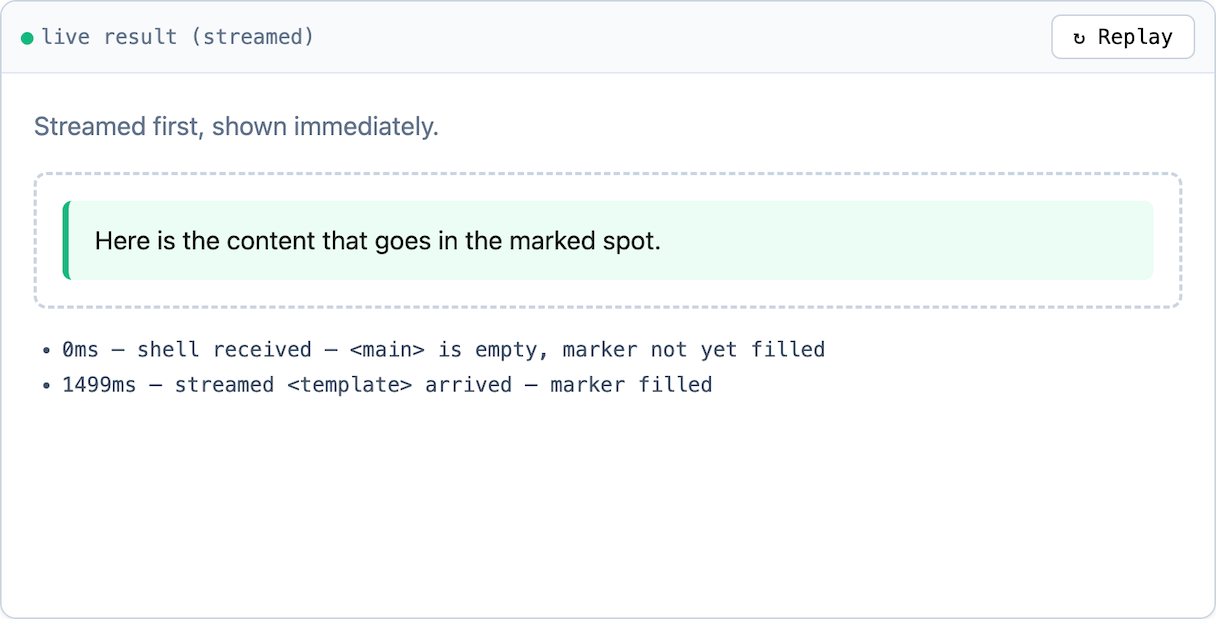
You leave a marker in your HTML and fill it in later with a <template>. That "later" can arrive in any order, even streamed from your server as the data becomes ready.
In this article, we'll look at how the feature works, some of the use cases it unlocks, and a new component model I think it quietly makes possible.
What declarative partial updates are
It starts with a marker. A marker is a placeholder you drop into your HTML that, on its own, renders nothing:
<main>
  <?marker name="content">
</main>
The <?marker> syntax is a processing instruction. When the browser parses it, it doesn't show anything. It just remembers the spot so you can fill it later.
You fill it with a <template> that points at the same name:
<template for="content">
  <p>Here is the content that goes in the marked spot.</p>
</template>
The for attribute matches the marker's name. When the browser reaches this <template>, it takes the content and drops it into the content marker. The <template> itself never renders. It's only the delivery mechanism.
Most of the time you'll want a loading state in the meantime. A range marker lets you wrap placeholder content between a <?start> and an <?end> processing instructions:
<main>
  <?start name="content">
    <p>Loading…</p>
  <?end>
</main>
Now the Loading… paragraph shows straight away. When the matching <template for="content"> arrives, it replaces everything between <?start> and <?end>.
This syntax is borrowed from XML, where markup like this carried instructions to whatever was processing the document. Until now HTML has had no such concept of processing instructions, so browsers simply treated all processing instructions as comments. Part of this feature is enabling processing instructions as proper node types in HTML. These can be used for the <template for> processing, but may also have other uses.
Until now, doing this from the server wasn't really an option. You'd send the page, then reach for JavaScript on the client to patch it:
const html = await fetch("/partials/about")
  .then((response) => response.text());

document.querySelector("main").innerHTML = html;
That's an extra request once the page is already up, plus the JavaScript to wire it together. With markers and templates, the server streams the real content into the same response. No extra request, and no client-side code.
Streaming content out of order
Here's where it gets interesting. The <template> that fills a marker doesn't have to come right after it. It can come much later in the document, which means you can send your HTML in a different order than it appears on the page. That's what "out of order" means.
A common example is a mega menu: the big navigation panel at the top of a site. It sits early in the DOM, so the browser parses all of it before it reaches the content below. But the visitor can't see it until they interact with it, so it's holding up the important content (the Largest Contentful Paint, for example).
With a marker, you put a small placeholder where the menu goes, send the main content first, and stream the menu's HTML at the end of the response:
<header>
  <?start name="menu">
    <!-- the menu fills in here -->
  <?end>
</header>

<main>
  <h1>Today's deals</h1>
  <p>The content the visitor actually came for, sent first. LCP candidate.</p>
</main>

<!-- streamed at the end of the response (or later) -->
<template for="menu">
  <nav><!-- a few hundred lines of menu markup --></nav>
</template>This helps your Largest Contentful Paint (LCP), the moment the largest piece of content becomes visible. By sending the content the visitor came for before the menu, the browser can paint it sooner instead of waiting on markup nobody is looking at yet.
One thing to watch: if the menu fills in after the page has painted, it can push other elements around and hurt your Cumulative Layout Shift (CLS), the metric for unexpected movement. Reserve space for late-arriving content with CSS so the layout doesn't jump when it lands.
Keep your app shell, stream the page
This is the use case I'm most excited about. Think about the parts of an app that wrap your content: a navbar, a sidebar, maybe a player pinned to the bottom. They hold state. The sidebar has a section expanded. The search box has half-typed text in it. The audio player is mid-song.
A normal full-page navigation throws all of that away. Every click reloads the whole document, so the navbar and sidebar are rebuilt from scratch and lose their state. The usual fix is a single-page app, where a framework keeps the shell mounted and swaps only the content. But that means shipping and running that framework.
Markers give you the same result with plain HTML. You make the shell static and mark only the part that changes:
<body>
  <nav>
    <!-- navbar with its own state -->
  </nav>

  <aside>
    <!-- sidebar: an expanded section, a search box -->
  </aside>

  <main>
    <?start name="page">
      <p>Loading…</p>
    <?end>
  </main>
</body>
Each navigation streams a new <template for="page"> with the next page's content. The browser replaces the page marker with it and touches nothing else.
There's a catch if you want this to keep working past the first navigation: a marker is consumed when it's patched. The <?start> and <?end> instructions are replaced along with the content between them, so a template carrying only the page's content leaves nothing behind for the next navigation to aim at. Have each template re-emit the range around its content:
<template for="page">
  <?start name="page">
    <h1>About</h1>
    <p>…the next page's content…</p>
  <?end>
</template>
Now every update hands the next one a fresh marker.
Here's why that matters. Because the navbar and sidebar are never re-rendered, their DOM nodes keep their identity. And state lives on those nodes: the scroll position, the focus, the text in the search box, a running CSS animation, any JavaScript holding a reference to an element. Replace only the page marker, and all of it survives. This is the thing we used single-page apps (SPA) for to be able to pull it off. Here the browser does it for free, because you only patched one region.
This would require some JavaScript to pull of as we need to intercept link clicks and fetch the next page. I'll cover it in depth in a future article, but the point here is you can do it if you want to. The server sends the next page as a template, and the client fills it in. No framework required.
Driving updates from JavaScript
So far everything has been server-driven and declarative, with no JavaScript at all. The page streams markers and templates, and the browser fills them in.
Sometimes you want to drive the update from the client instead, for example you're handling navigations in JavaScript and fetching the next page yourself. For that there's an imperative API:
// the container element whose content we'll replace (not a marker)
const main = document.querySelector("main");
const html = await fetch("/partials/about")
  .then((response) => response.text());

// runScripts: true opts in to executing <script> tags in the new HTML
main.setHTMLUnsafe(html, { runScripts: true });
Notice we call setHTMLUnsafe on <main> itself, not on a marker. That's the difference between the two paths: the declarative path fills a named marker, while setHTMLUnsafe is an element method that replaces the content of whatever element you call it on.
There's one catch on this path. Unlike a server-streamed template, HTML you insert with setHTMLUnsafe doesn't run its <script> tags by default, the same as innerHTML today. When the new content needs to wire itself up, you opt in with { runScripts: true }.
There's also a streaming version, streamHTMLUnsafe(). It returns a WritableStream, so you can pipe a fetch response straight into the page as it arrives, without waiting for the whole thing to download:
const response = await fetch("/partials/about");

// stream the response into the page as it arrives
response.body
  .pipeThrough(new TextDecoderStream())
  .pipeTo(main.streamHTMLUnsafe({ runScripts: true }));
A fetch response body is a stream of bytes, but streamHTMLUnsafe() expects text, so TextDecoderStream sits in the middle and decodes the bytes as they flow through. The browser parses and shows the content chunk by chunk, so the visitor sees the start of the page before the server has finished sending the rest.
Introducing a new Native Component Model
Now let's put the pieces together, because this is where I think it gets genuinely interesting.
A <template for> can carry any HTML. That includes a <style> block and a <script>. So a single streamed template can hold a region's markup, its own scoped styles, and its own behavior, all in one unit:
<template for="main">
  <style>
    @scope {
      h1 {
        color: hotpink;
      }
      p {
        line-height: 1.6;
      }
    }
  </style>

  <h1>Hello world</h1>
  <p>This region styles and wires up itself.</p>

  <script type="module">
    console.log("main component loaded");
  </script>
</template>The interesting part is @scope. It's a CSS feature that limits a block of styles to a subtree instead of the whole page. Written bare like this, with no selector after @scope, it scopes to the parent element of the <style> block. Once the template is patched in, that parent is the main region itself. So the h1 and p rules apply here and nowhere else, even though they read like global selectors. No class-name conventions, no build step rewriting your selectors.
The <script> is the behavior for this region. Notice the type="module". A module script buys you a few things for free here.
First, it runs in strict mode automatically, so the usual foot-guns (assigning to an undeclared variable, a stray this) become errors instead of silent bugs.
Second, it gets its own module scope: the top-level const, let, and function declarations stay inside the module instead of leaking onto the page's globals. That keeps two components' top-level variable names from clashing, and it means you can mount the same component twice without a "already declared" error. (It's only the variable scope that's isolated. The components still share one global object and the same document, so they can still step on each other through the DOM or globals.)
Third, modules bring more than this, like top-level await and import. You can use those features in your component's behavior without a build step, and they work as you'd expect.
Step back and look at what that template is. It's structure, style, and behavior for one piece of UI, written in plain HTML, scoped, and delivered by the browser itself. That's a component. We've had this shape for years in .vue and .svelte files, but always through a framework and a build step. Here there's neither. The wire format is the component.
To be clear about what's new: bundling structure, style, and behavior together isn't the new part, frameworks have done that for a long time. The new part is doing it with native browser primitives, no library involved, and streaming it into the page out of order.
Moreover, the script here still isn't truly encapsulated. The module scope keeps its variables to itself, but it shares the page's one global object and can reach across the whole document. So it's tidier than a classic <script>, but it's not isolated the way a real component instance is.
Real per-component isolation is what (Declarative) Shadow DOM (with Web Components and Custom elements) give you, that keeps behavior and state on the instance, but that's the heavier, more ceremonious model a lot of people would rather not reach for.
I've personally enjoyed working with Web Components and Shadow DOM. More than 120 encapsulated Web Components power my learning platform Learn JavaScript. However, I also understand the desire for a lighter, more flexible model. This is where, I think, declarative partial updates and @scope come in.
Further out, ShadowRealm, an early TC39 proposal, might one day let JavaScript run in its own isolated global, and maybe become the native way to give a component's behavior that isolation. Worth keeping an eye on.
Browser support
This is early. The feature ships in Chrome 150, and only behind a flag, while some sub-features ship in Chrome 152. Turn on chrome://flags/#enable-experimental-web-platform-features to try it. It is not Baseline, and you shouldn't ship it to production yet.
The encouraging part is the cross-engine signal. Firefox has given the proposal a positive standards position, and WebKit has signalled support too. It's rare to see all three engines leaning the same way this early, and it's a good sign this lands as a real, interoperable feature rather than a Chrome-only experiment.
Conclusion
Declarative partial updates start as a small idea, a marker you fill in later, but they reach further than that. They let your server stream HTML out of order to improve real metrics like LCP. They let you keep an app shell and its state without a single-page framework. And put together with @scope and runScripts, they sketch a native component model: structure, style, and behavior in one streamed unit, with no build step in sight.
It's behind a flag today, so treat the code here as something to experiment with rather than ship. But the direction is worth paying attention to.
Coming next
Markers and templates are really about one thing: letting the server decide what reaches the page, and when. That hints at a bigger shift, where your rendering isn't just sent from the server but actually aware of it. That's the subject of my next article, on server-aware partial updates. I'll link it here once it's out.
Updates
Updates and corrections will be added here as they come in.
- 2026-06-22: Switched the component model's
<script>to<script type="module">. A module script gets its own scope, so its top-level declarations stay local instead of leaking onto the page's globals. It also runs in strict mode automatically. - 2026-08-18: Corrected the app shell section. A marker is consumed when it's patched, so a
<template for="page">has to re-emit its own<?start>/<?end>range for the region to stay patchable on later navigations. The original example only worked for the first update.
If you spot something, please let me know.
With thanks to Barry Pollard, who helped review and correct some aspects of this article.